Virtualization in Cloud Computing
Virtualization in Cloud Computing
1. Virtualization
Overview
- Operating System concept: The abstraction of available resources
- Virtualization technologies encompass a variety of mechanisms and techniques used to address computer system problems such as security, performance, and reliability by decoupling the architecture and user-perceived behavior of hardware and software resources from their physical implementation. (https:/www.computer.org/csdl/mags/co/2005/05/r5028.html/)

Virtualization requirements
- Formal requirements for virtualizeable third generation architectures (Paper on D2L)
- A virtual machine is taken to be an efficient, isolated duplicate of the real machine.
- These notions can be explained through the idea of a virtual machine monitor.
- Essential characteristics of VMM:
- Essentially identical to the physical resource
- Efficiency
- Complete control of system resources (with regard to the processes running inside the VM)

Virtual Machine Monitor
- Virtualization Layer: The Virtual Machine Monitor (or its modern name: Hypervisor) provides an interface between hardware and virtual operating systems.
- Type of hypervisors:
- Bare-metal
- Hosted

Issues that virtualization can help with
- Under-utilized resources
- Complicated system management
- Limited access to shared resources
- Inefficient power consumption
- Tight coupling with underlying resources
Virtualization versus multitasking versus multicore/hyperthreading

2. Types of virtualization
Overview
- Platform Virtualization
- Memory Virtualization
- Desktop Virtualization
- Application Virtualization
- Network Virtualization
- Storage Virtualization
Platform virtualization
- Full Virtualization
- Para Virtualization
- Hardware assisted virtualization
- OS level virtualization
Without virtualization
- x86 offers four levels of privilege (Ring 0 through 3)
- OS needs to have access to hardware and run on ring 0
- Application runs on ring 3, gain access to hardware by trapping into kernel mode for privileged instructions.
- Virtualizing x86 requires a layer under OS (which already at lowest level) to create and manage the VM
- Sensitive instructions must be executed in ring 0

Full virtualization
- Guess OS is unaware of host OS.
- VMM provides virtual BIOS, virtual devices, and virtual memory management.
- Non-critical instructions run directly on hardware.
- Runtime translation of critical non-virtualizable instructions happens in the hypervisor.
- Provide best isolation and security at the cost of performance.

Para virtualization
- Thin layer interfaces between each guest OS and underlying hardware.
- Need guest kernel modification.
- No need of runtime translation for critical instructions.
- Superior in performance.
- Requires expertise to patch the kernels.

Hardware-assisted virtualization
- Hardware provides support to run instructions independently.
- Intel Virtualization Technology (VT-x)
- AMD Virtualization Technology (AMD-V)
- No need to patch the kernels.
- Runtime translation not required.
- Better performance in comparison to other variants.
- Greater stability

Virtualization at OS level
- Same OS for both host and guest machines.
- User space is completely isolated.
- High performance.
- Extremely light-weight.
Memory virtualization
- How to share physical system memory and dynamically allocating it to virtual machines.
- Guess OS maps virtual memory space (of VM) to physical memory space (of VM).
- VMM translates physical memory space (of VM) to physical memory space (of main machine), but also enables direct mapping (shadow table) to avoid overhead.

Summary
- Comparative issues
- Guess modification/compatibility
- Performance
- Guest OS hypervisor/independent
=== “Full/binary translation”
1
2
3
 - Unmodified guest OS, excellent compatibility
- Good
- Yes
=== “Hardware assisted”
1
2
3
 - Unmodified guess OS, excellent compatibility
- Fair
- Yes
=== “OS assisted/para”
1
2
3
4
5
6
 - Guest OS codified to run Hypercall
    - Cannot run off native hardware or other hypervisors
    - Poor compatibility
- Better on certain cases
- Xen Linux runs only Xen Hypervisor
    - VM-Linux is hypervisor-agnostic
Desktop and application virtualization
- Desktop and Applications run on servers.
- Stateless thin clients connected to servers.
- Efficient system management.
- Requires high-end servers for system stability
Network and storage virtualization
- Similar idea of providing an abstraction layer to the physical infrastructures
- In networks, abstraction will
- Be at the level of routers, switches, gateway, firewalls, load balancers, …
- Enabled by software-defined networking
- In storage, single storage backends can be used for different requirements
- Ephemeral
- Persistent
- Specialize storage backends
3. Virtualization: concept of overcommits
Overview
- Allocating more than the available physical resources to the Guest OS
- Common types of overcommit:
- CPU
- Memory
- Storage
Virtualization: concept of overcommits
- Advantages:
- Favorable economic model
- Efficient resource utilization
- Support green computing
- Disadvantages:
- Performance loss or unstable system response
- Complex system understanding
- VM shutdown by the hypervisor
Virtualization: CPU and memory overcommits
- Allows more virtual CPUs than physically available
- Openstack KVM: overcommit-number = 16.0
- Allow more memory than physically available
- Openstack KVM: overcommit-number = 1.5GB
Virtualization hypervisors
- Contribution from industry and academia
- Xen: Project from Cambridge Computer Laboratory
- VMware: Commercial product
- Also comes from academic research (see Mendel Rosenblum ACM)
- KVM: Initiated by the Open Virtualization Alliance, later dissolved and is now managed by the Linux Foundation
- Qemu: Open source machine emulator and virtualizer
4. Virtualization in the cloud: OpenStack
Logical architecture
- OpenStack Design
- Module types:
- Daemon: runs as a background process.
- Script: installs a virtual environment and runs tests.
- Command-line interface (CLI): enables users to submit API calls to OpenStack services

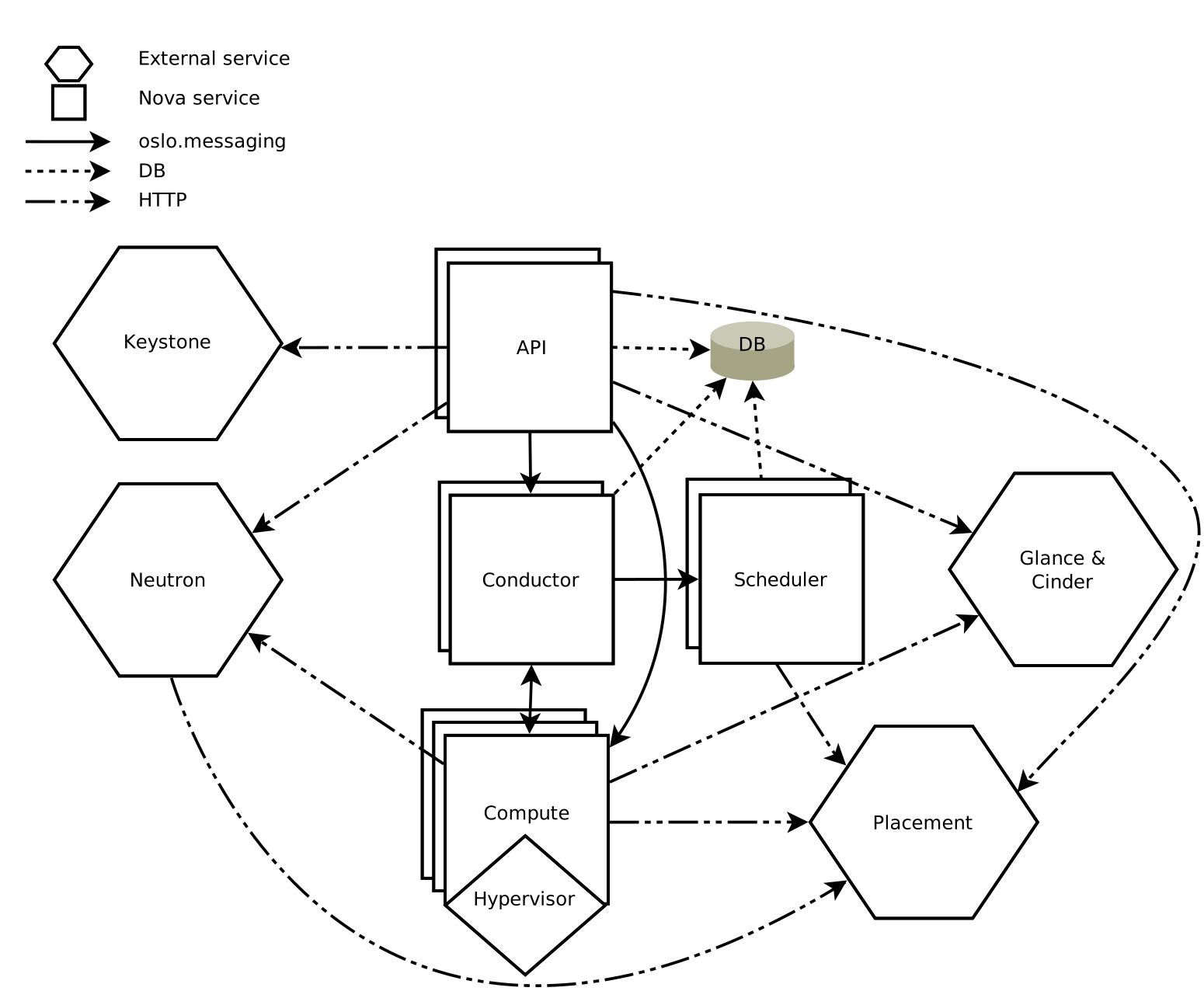
- Compute: Provision compute instances
- Keystone: Identity and authentication
- Glance: Compute image repository
- Neutron: Provision virtual/physical networks
- Placement: Tracking inventory of resources available in a cloud
- Cinder: Provision block storages
OpenStack: Compute
- Message-based, “share-nothing” architecture
- User-facing: REST API
- Internal communication: RPC
- Supported/controlled hypervisors:
- Baremetal
- Hyper-V
- KVM
- Linux Containers (LXC)
- Quick Emulator (QEMU)
- Virtuozzo
- VMWare vSphere
- zVM
Openstack: Cinder
- Providing volumes to VMs, baremetal hosts, containers, etc.

Openstack: Neutron
- Management: internal comm between OpenStack components, reachable only within the data center.
- Guest: Used for VM data communication within the Cloud Deployment.
- External: Provide VM with Internet access.
- API: Exposed all the Stack’s API to the public.
