Models
Models
Purpose of models
- Simplification of reality
- Facilitates communication during process steps
- Requirements
- Architecture (system design)
- Program design
- Need multiple models
- Different perspectives
- Different levels of completeness, formality
- Larger, more complex projects benefit from more formality
- Most models are consumed by humans
Representing models
- UML: Unified Modeling Language
- Models consist of diagrams and specifications
- Many different diagram types
- Particularly well suited to object-oriented design
- Can serve many purposes
- Facilitate discussion
- Provide documentation
- Generate code
- Why not code?
- Can have multiple models with simplifications serving different perspectives
- Code usually must pick a single abstraction; can’t manifestly show correctness for other perspectives
- Code can introduce syntactic distractions, platform details
- Sometimes, (pseudo)code is the clearest specification
Modeling perspectives
- External
- Represent the (simplified) context of the system
- Interaction
- How do user and component interactions proceed?
- Structural
- How are system components organized?
- How is data represented?
- Behavioral
- How system responds to events, changes over time
Interaction models
Overview
- Modeling user interactions helps catalog functional requirements
- Modeling inter-system interaction helps highlight potential communication problems
Use cases
- Discrete task involving external interaction with the system
- Actor
- A role, not an individual
- Beneficiary or instigator
- May be other systems
- Use specific, not generic names
- Use case
Pair with textual description
- Metadata
- Name of use case
- Goal of use case
- Actor(s)
- Trigger
- Preconditions
- Postconditions
- Flow of events
- Basic flow
- Alternate flows
- Exceptions
Example
- Name: Take exam
- Goal: Enables a student to take an exam online with a web browser
- Actor(s): ExamTaker
- Trigger: ExamTaker is notified that the exam is ready to be taken
- Preconditions:
- ExamTaker is registered for course;
- ExamTaker has authentication credentials
- Postconditions: Completed exam is ready to be graded
- Basic flow (“Take exam” use case)
- ExamTaker connects to sever via web browser
- Server checks whether ExamTaker is already authenticated; if not, triggers authentication process
- ExamTaker selects an exam from list
- ExamTaker repeatedly selects a question and either types in a new solution, edits an existing solution, or uploads a file with a solution
- ExamTaker either submits exam or saves current state
- When exam is submitted, server checks that all questions have been attempted and sends acknowledgement to ExamTaker
Alternative flows
- Alternative path to successful completion of use case
- Example: Take exam
- View feedback
- Request regrade
- Exceptions: Lead to failure of use case
Relationships
- «extends»
- Defer extra detail to other use cases
- Useful for alternate flows and exceptions
- «includes»
- Include steps from another use case
- Useful when common procedure is required in multiple contexts
Sequence diagrams
- Show sequence of interactions (ordering, causal relationships) between actors and objects
- Excellent for documenting communication protocols
- See examples at https://www.eventhelix.com/networking/
Behavioral models
Overview
- Model dynamic behavior of system during execution
- How does system process data or respond to events?
- Data-driven models
- Show sequence of processing steps from input to output
- Event-driven models
- How does system respond to events? (internal and external)
- Assumes finite number of application states
- Great for embedded, real-time systems
Data flow (activity) diagrams
- Activity: rounded rectangle
- Data: rectangle or labeled edge
- Data source/sink: rectangle
- Beginning/end: circle
Example: university admissions
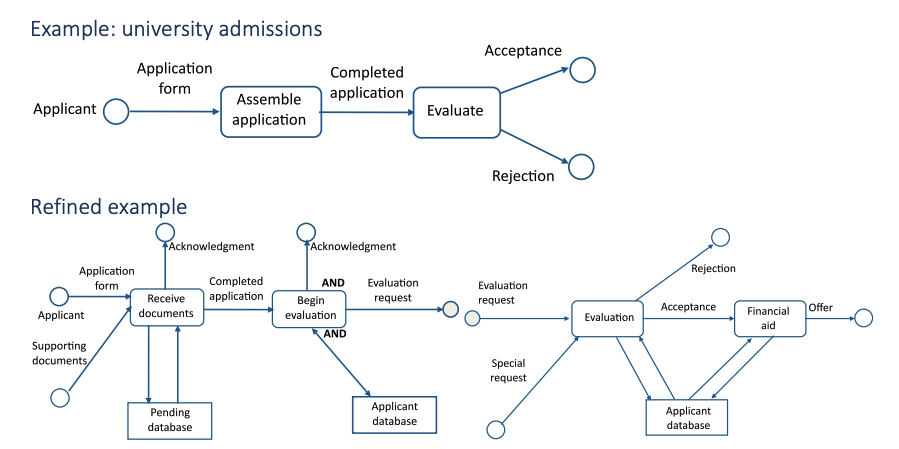
How to specify logic?
- Data flow & sequence diagrams show high-level flow; must be augmented by specifications for low-level behavior
- Decision table
- Process columns from left to right
- Rules are specific and testable
- Can be clearer to clients than code
Flowcharts and pseudocode
Flowchart
- Shows logic (not just flow)
- Used to specify computer programs before modern programming languages
Pseudocode
- Compact and precise
- Composable
- Easy to implement
- Harder to see flow
Mathematics
- Many systems are well-described by mathematical models
- Differential equations
- Probability distributions
- Integrals
- Filters
- Interpolation
- Curve fits
- Document progression of approximations and domain transformations
- Frequency vs. time domain
- Continuous vs. discrete
- Differential vs. difference equations
- Integration vs. quadrature
- Root solve vs. Iteration
- Higher-level specifications give developers more flexibility, can improve maintainability
State charts / transition diagrams
- Model system as a finite set of states
- A transition moves the system from one state to another
- Triggered by a condition
- Mathematically, a function from S⨯C → S
- Can be hierarchical Also useful for user interface navigation
Transition tables
- Specify state transitions in textual form
- Useful when transitions are “dense” (most conditions are applicable in most states)
- Example: physical buttons on embedded device
- Can visually check for completeness
